The task is ready
Customer details, address and the right form come from the back office or a connected system.
For fibre and utility companies
From customer visits and map drawings to signatures, PDFs and messages — the same process, every time.
From task to handover
Connectives follows the work from start to finish. Staff see what the task requires. The rest is handled around the case.
Customer details, address and the right form come from the back office or a connected system.
Forms, annotated photos and map drawings are captured directly on a phone or tablet.
Sign on screen or through a secure link sent by email or SMS.
The PDF is generated in the provider’s branding, and every message can be tracked in the outbox.
The shared foundation
Forms, templates and rules can be configured in the system. When a provider’s requirements change, your workflow does not have to start over.
Build your own forms with the fields, sections and pick-lists the work needs — and show only the questions that apply.
Multiple approvers, signing links and completed documentation in the provider’s own branding.
See what was sent, to whom and when — and send it again if something went wrong.
Cadastral maps, drawings, annotated photos and customer uploads collected in one case.
Telecom operators, contractor portals and utility companies, Danish address data and map layers where the work requires them.
Availability, booking links and calendar synchronisation without double bookings.
Two editions. One platform.
Lite and Pro share forms, documentation, integrations and a mobile app. The difference is whether each job stands alone or forms part of a larger workflow.
For companies where each agreement stands alone: a visit, a form, a signature and a finished PDF.
For projects with dependent tasks, different contractors and an overview of progress.
Moving from Lite to Pro adds capabilities — not a new way of working.
The same forms, templates and integrations remain familiar.
Connectives Pro in depth
Pro is for work that hangs together: a rollout with many customers, every customer with a flow of their own, and every step carried out by the firm that has to carry it out.
The provider’s rollout — say “Utility company, Silkeborg 2026”. The project holds every case, shows progress and carries a default template for new cases.
One customer, one address, one flow. A case has its own status, deadlines, external status, files and position on the map — and its own tasks.
The actual work: form, photos, map drawing, signature and PDF — with a performing firm and a person on it.
Everything in Lite comes along at task level. Pro adds the project, the case and the flow on top — and that is where the new work has happened.
A template describes the flow once: the steps, the task type each step is, what the step waits for, which firm performs it and a deadline in days. Creating a case generates every task at once. The ones that wait sit on hold with the reason waiting for the previous step, and are released automatically when that step is finished.
An urgent case gets shorter deadlines, is marked ⚡ and goes to the top of the case list and the map. Make a case urgent or move its start date, and the deadlines on its open tasks adjust automatically. Optional steps are chosen per case — leave one out and the next step waits for whatever that step was waiting for.
A subcontractor firm gets its own login and sees only the tasks it is doing — not other firms’ work. Access is closed by default: anything the firm hasn’t explicitly been given, it can’t see — it can’t even tell whether other cases exist. The firm hands out its tasks to its own people, and sees its part of the case as finished as soon as its own tasks are done — without waiting for everyone else.
Every open case is a pin with a symbol for how it is doing: overdue, needs action, awaiting customer, in progress, not started, completed. The map refreshes every 30 seconds, marks what changed, and goes full screen for a wall display. Cases at the same address — flats in one stairwell — open as a list beside the map.
When a case also needs a status in the customer’s own system — a network owner’s operations system, for instance — the values are set up as a list, and the template picks the starting value and which step moves it on. The office can always set it by hand, and the flow will not overwrite a hand-set value. Every change is kept, so you can see who moved it — or whether it happened automatically.
A price list belongs to a provider: item number, unit, price and an optional validity period — next year’s prices are a copy, and lines can be pasted in from Excel. A task type can give new tasks their services with an estimated quantity, and the office corrects them to the real quantity before invoicing. Name and price are copied onto the task, so a later price change never rewrites history.
Splice plans, drawings, permits and customer information go on the case with a category and a note, and show on every task of that case. They are not public — only people who are logged in can open them. Subcontractors can download the files on their own cases — except the ones marked for the office.
A task type can notify the office the moment a task is completed — in the app, through a link or signed on a tablet. The email carries the customer, the address, who did the work, links to the task and the case, and what its services come to, including how many lines still need a final quantity.
Pro is not a fibre installation by default. The fibre importers are off, the file categories on a case are set up per installation, and a task type can switch signature, links and the PDF off — an office step such as documentation or invoicing has no use for them. What is switched off is off for real — not just hidden.
A Pro installation runs completely separately from other customers’.
The same app works against both Lite and Pro and detects for itself which kind of installation it is talking to. An administrator can see the system the way a particular user sees it — the shortest route to helping a subcontractor with whatever is on their screen.
The Connectives app · For Lite and Pro
The app is built for consultants and technicians working at customer sites. On a phone or tablet, you have the day’s visits, customer details and documentation at your fingertips.
One app for both editions. Work with agreements in Lite and tasks in Pro. The app automatically recognises the installation it connects to.
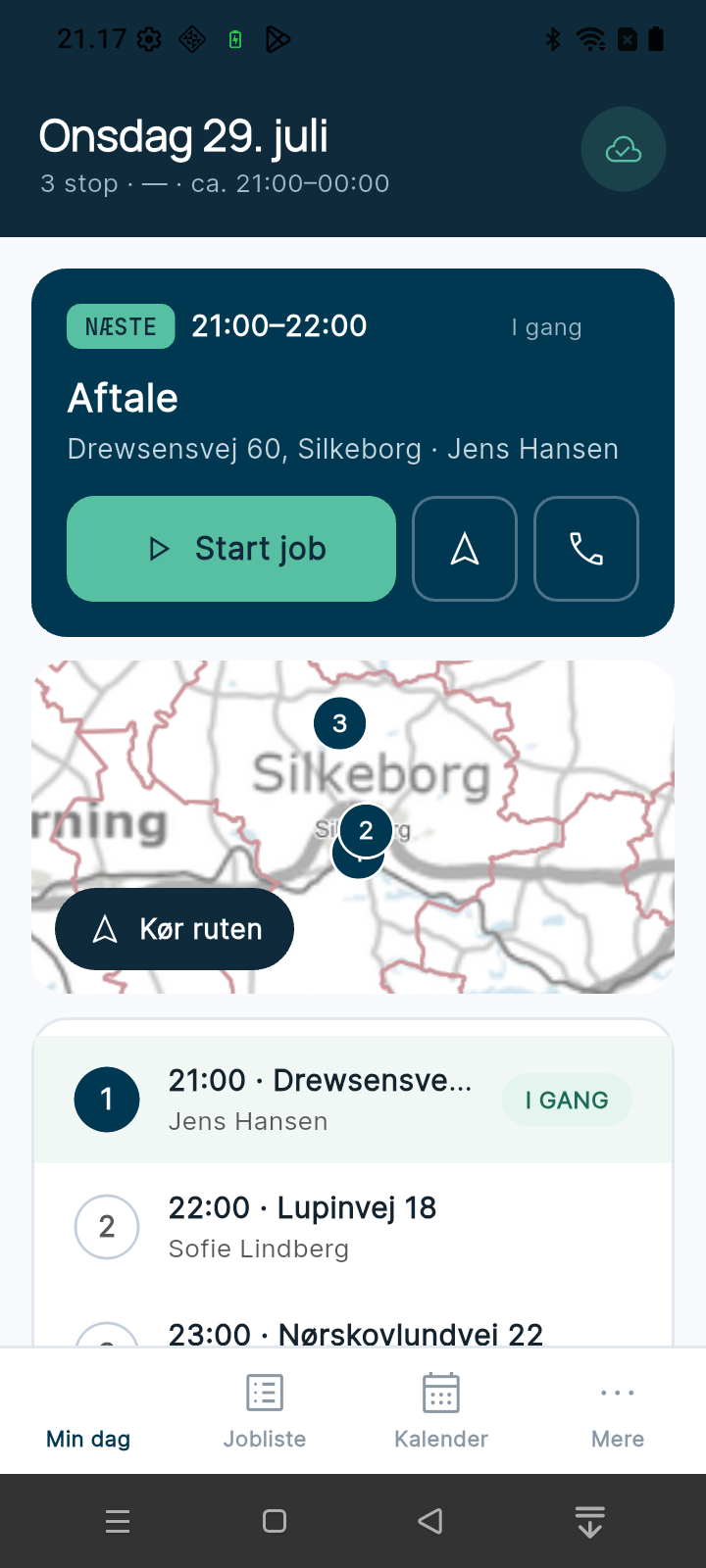
See the next visit, today’s stops and addresses on the map. Start the job, open navigation or call the customer directly from your daily overview.
Search the job list by name, address or ID, and filter by status. The calendar brings your bookings together so you can see what is coming up.
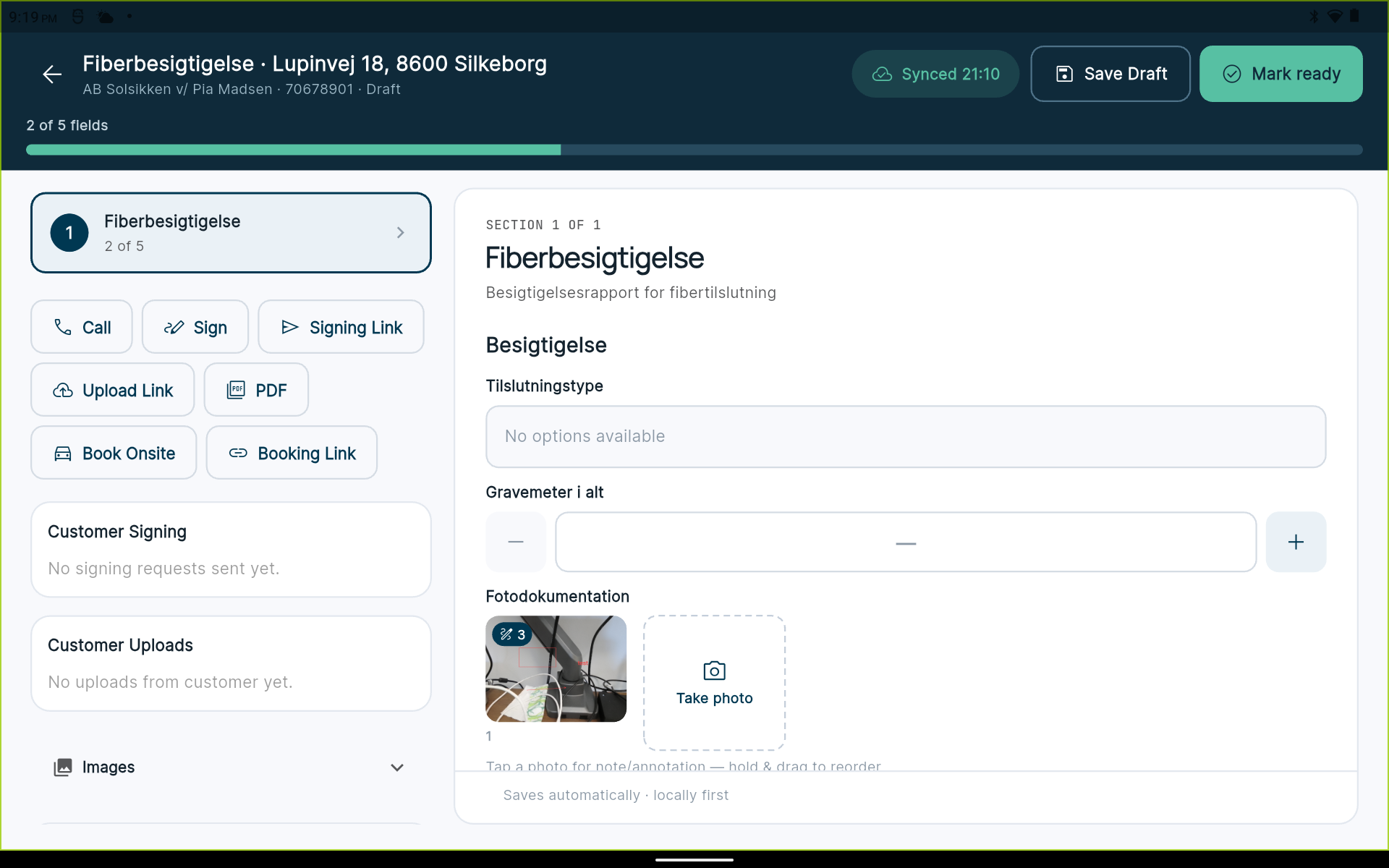
Complete the form, take photos and add notes. Save a draft, track form completion and mark the work ready once the documentation is in place.
Collect a signature on site, send a signing or upload link, open the PDF and book a visit from the case.
See in the app when it last sent and fetched data, what is still waiting to be sent, and whether anything needs sorting out. Connect to your organisation using a QR code or your portal’s web address.
Our approach
We have no marketing department and no sales department. You talk to the people who write the code — and who will implement what we agree on.
See how we workValue means a job taking four minutes instead of twenty — not a system with the longest feature list.
Small improvements go live, get measured and are followed by the next. That makes change manageable.
AI handles the mechanical work. People decide how the system and the workflow should work.
Frequently asked questions
Short answers to what usually decides whether Connectives fits the work.
Connectives is a tool for field documentation and job management. The form, the photos, the map drawing, the signature and the finished PDF belong to one workflow — in the mobile app and on the web — so what was done is also what is documented.
Lite is for work where each agreement stands on its own: visit, form, signature, finished PDF. Pro adds the project, the case and an automatic task flow on top, so dependent tasks and several performing companies hang together. They share forms, templates, integrations and the same app.
No. The foundation is task types and forms you set up yourself. Fibre imports can be switched off, file categories are configured per installation, and a task type can turn signatures, links and PDFs off — for a back-office step such as invoicing. The industry decides the content, not the system.
On screen at the customer's, or through a secure link sent by email or SMS. An agreement can carry several approvers, and the PDF is produced in the provider's own brand. Every message can be traced in the outbox and sent again if something went wrong.
Yes. A subcontractor firm gets its own login, hands out tasks to its own people and sees only its own tasks. Access is closed by default: anything the firm hasn’t explicitly been given, it can’t see — it can’t even tell whether other cases exist.
Yes — one app covers both and detects for itself whether it is talking to a Lite or a Pro installation. You have the day's visits, the job list, the form and the customer's signature at hand, and can see in the app what has been sent and what is still waiting.
Danish, German and English — in the system, in the app and in the documentation sent to the customer.
Each company gets its own separate installation at its own web address, so one company's cases never sit alongside another's. Files on a case are not public — only people who are logged in can open them, and subcontractors only get the files on their own cases.
We start by understanding the workflow that should get simpler, and build a working draft rather than a pitch deck. You talk to the people who write the code. Call (+45) 7026 0099 or write to info@lkgroup.dk.
Connectives by LK Group
A working draft beats a pitch deck. We start by understanding the workflow that needs to become simpler.
Tell us about your work and what you would like to make simpler.
(+45) 7026 0099info@lkgroup.dkDanish business registration (CVR): 38732102